MTK PRO Tool V54
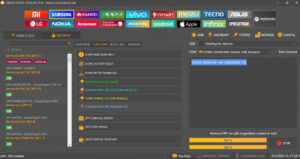
MTK PRO Tool v54 is designed for MediaTek (MTK) smartphones. There is no premium version of this software; it is completely free to use. Nowadays, almost everyone owns an Android device, and software issues frequently arise with them.

MTK PRO Tool
Size: 1.96 GB
Version: v54
Compatible: Windows 7,8,10,11
While we often visit mobile repair shops where fixing software problems can sometimes be quite expensive you can actually resolve these issues at home. However, you will need a laptop or computer to install and use the MTK PRO Tool.
What can the MTK PRO Tool do?
Below is a list of the mobile issues that can be resolved using the MTK PRO Tool V54 software:
- Auth Bypass (MTK)
- Fix (Dm-Verity Flash)
- Fix (Dm-Verity)
- Out From Brom
- FRP MTP MTK / SPD / Exynos
- Reset FRP (MTK v6)
- Format FRP (Gmail)
- Format (UserData)
- Switch To Brom
- Reset Old MTK / SPD
- Reset (Mi Account)
- Unlock (BootLoader)
- Reset (Meizu Cloud)
- Backup (NvData)
- Read Code MTK / SPD (Old)
- Vivo Remove Demo
- Relock (BootLoader)
- Format Recovery
- Format (NvData)
- Format Old Nokia
- Erase Huawei ID
- Read Huawei Oeminfo
- Read Info (MTK)
- Erase (Anti Theft)
- Format Via HWK / SarasSoft
- Read Scatter.txt
- Write Huawei Oeminfo
- Read (Preloader)
- Permanent Unlock
- FRP Samsung MTK Test Point
- Read (Flash.bin)
- Reset MDM MTK Brom
- Read (Boot.img)
- Write (Boot.img)
- FRP Samsung MTK No Test Point
- Write (Flash.bin)
- Reset Screen (Para)
- Safe Format Misk
- Reset Screen Misk
- Format (UserData + FRP)
Supported Mobile Brands
Here are the mobile brands supported by the latest version of MTK PRO Tool V54:
- Xiaomi
- Redmi
- POCO
- Vivo
- OPPO
- Realme
- Infinix
- TECNO
- itel
- Lava
- Micromax
- Nokia (MTK Models)
- Lenovo
- Motorola (MTK Models)
- Huawei (MTK Models)
- Meizu
How to install the setup?
Installing the MTK PRO Tool setup is very easy. First, you need to download the tool’s setup file.
- Next, extract the setup from the zip file.
- If the zip file is password-protected, use the following password: “tfttool123“
- Now, double-click the setup file and select the install option.
- Grant the necessary permissions to proceed, and the installation will complete successfully.
- You can now use the MTK PRO Tool.
Related Tools
TFT MTK Module Tool || ST MTK Tool || TFT MTK Module v3.5 | MTK Dimensity Software Tool || Phoenix Service Tool ||

Post Comment