Huawei USB com 1.0 Driver.zip
Huawei USB com 1.0 Driver.zip Driver is a software utility that enables Huawei mobile devices to connect to a computer. This USB driver is installed on a desktop computer or laptop. If, after connecting your device, your computer displays an “Unknown Device” notification or fails to detect the device entirely it is likely that the necessary USB driver is missing from your system. To resolve this issue, you must install the appropriate USB driver, which can be downloaded and installed completely free of charge.
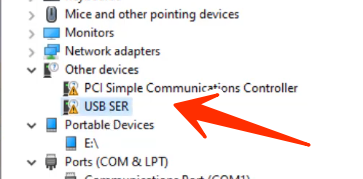
Huawei USB com 1.0 Driver
Version: v1.0
Size: 10 MB
Compatible: Windows
What Does the Huawei USB COM 1.0 Driver Do?
When connecting a Huawei mobile phone to a computer via USB, a specific USB driver is required to facilitate communication between the Windows operating system and the phone. Without this driver, users will frequently encounter “Unknown Device” errors or various other system malfunctions.
Whenever a mobile device requires a software update or “flashing” (re-installing the firmware), it must be connected to a computer. USB drivers of this type are primarily utilized for these specific tasks. This particular USB driver falls under the category of tools used for mobile flashing and repair. Typically, average users do not require this driver.
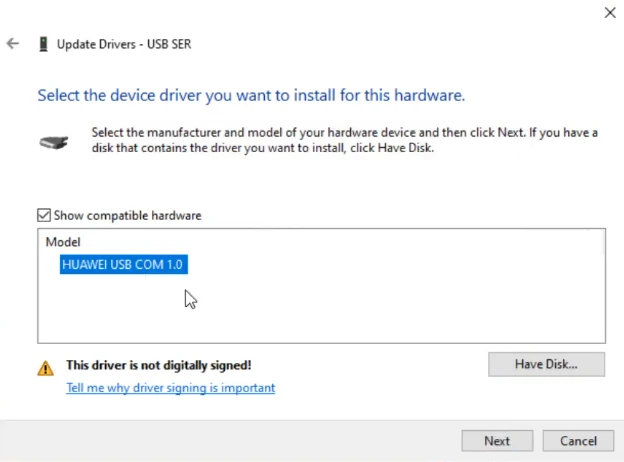
For Which Users Is This Driver Useful?
The Huawei USB COM 1.0 Driver is particularly important for individuals experiencing software-related issues with their mobile devices specifically for tasks such as:
- Flashing a Huawei phone
- Bypassing FRP (Factory Reset Protection)
- Performing bootloader-related operations
- Fixing issues where the device is not being detected via USB
- Connecting the phone to mobile repair tools/software.
Final Thoughts
If you are a mobile technician who frequently performs mobile flashing and software-related repair tasks, you have undoubtedly heard of the Huawei USB COM 1.0 Driver. It is a very simple, compact software utility that is also extremely easy to install. If your mobile device is not being detected by your computer, utilizing this USB driver is an effective solution to resolve the issue.


Post Comment