Fastboot Command Extractor Tool
The Fastboot Command Extractor Tool is specifically designed for mobile developers and mobile repair technicians. If you want to use it for your personal mobile phone, you’ll need to be a little more technical. This is a recent tool that has been launched.
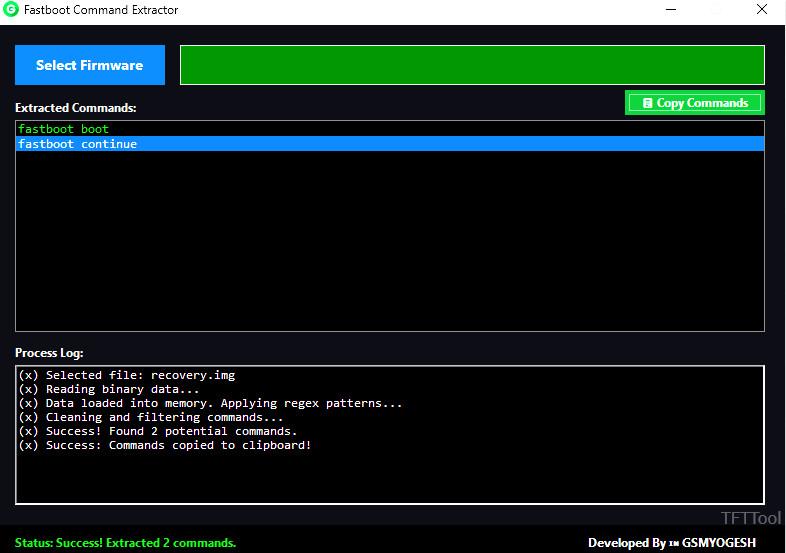
Fastboot Command Extractor
Size: 2.2MB
Version: v3
Compatible: Windows
What are Fastboot Commands?
Fastboot commands are basically text that we enter into our PC, and this tool interprets it as keyboard commands. Commands are transmitted to the device through these tools. Simply put, you can control the device through your computer. The commands are sent to the device like this:
- fastboot devices
- fastboot flash boot boot.img
- fastboot oem unlock
- fastboot reboot
Mobile phones are controlled using these commands.
What is the Fastboot Command Extractor Tool?
Fastboot Command Extractor is software that extracts firmware files, flash scripts, or fastboot commands from the internal structure of the tool. This tool works specifically in the following places:
- .bat files
- .cmd scripts
- Flash tool packages
- Factory firmware folders
Why is an Extractor Tool needed?
Many tools are in encrypted formats. This tool is used to open them. Sometimes, firmware contains long scripts for multiple partitions. Simply put, some files and tools are not in normal files, but in encrypted files. Fastboot Command Extractor Tool is used to extract or learn about them.


Post Comment