Chris Titus Tool
The Chris Titus Tool is a software utility designed to make your computer significantly faster and more lightweight. The Windows operating system is the most widely used desktop operating system in the world. Whether for personal use, office work, or gaming, this operating system is utilized across virtually every domain.
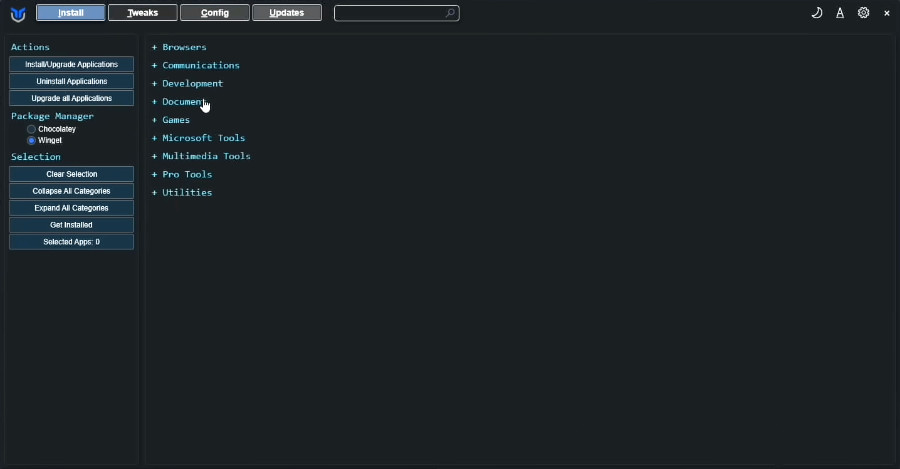
Chris Titus Tool
Version: 2026
Developer: Chris Titus Tech
Compatible: Windows
| Chris Titus Tool Command>> | irm “https://christitus.com/win” | iex |
However, as time passes, users often encounter various issues with it—the most significant problem being a slowdown of the Windows system. Over time, computers tend to become sluggish; the primary culprits behind this are unnecessary background services and an accumulation of various applications. Furthermore, there are certain system settings that can be difficult for the average user to optimize manually.
About the Chris Titus Tool
Every user wants to keep their computer running fast and clean. However, as time goes by, performance inevitably begins to degrade. Resolving this issue manually can often be a cumbersome and complicated process. Fortunately, with the help of the Chris Titus Tool, you can easily optimize your computer. This tool was developed by a creator named Chris Titus Tech and has become incredibly popular for its effectiveness in optimizing Windows systems.
This tool operates via PowerShell and provides users with the ability to manage various hidden settings embedded within their Windows PC.
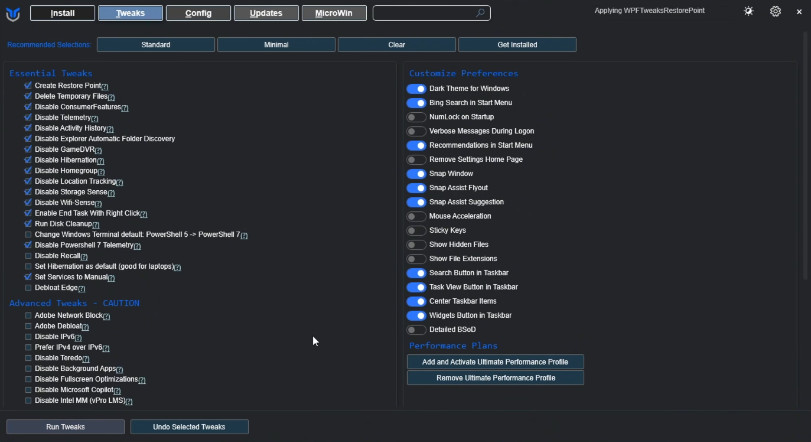
Key Functions of the Chris Titus Tool
Let’s explore exactly what you can accomplish using this tool:
- Speed up Windows
- Remove unnecessary apps
- Improve privacy settings
- Control Windows updates
- Boost system performance
These are its core functions, and it is precisely because of these capabilities that the tool has garnered such popularity among users.
Why is the Chris Titus Tool So Popular?
There are several reasons behind this tool’s widespread popularity. First and foremost, tools of this specific nature—offering such comprehensive functionality—are a rare find on the internet. Additionally, several other features contribute to its popularity, including:
- Lightweight design
- Free and Open Source
- Safe and secure optimization
- User-friendly interface
- Enhanced privacy features
Chris Titus Tool System Requirements
Now, let’s take a look at the system requirements for running this tool:
- Windows 10 / Windows 11
- PowerShell access
- Internet connection
- Administrator permissions
Is Chris Titus Tool Safe?
Chris Titus Tool is a Windows PC software, and it is safe. The developer of this tool, “Chris Titus Tech” has a YouTube channel where he shares details about this tool. Be sure to check out his YouTube channel. You can learn more about Chris Titus Tool from it.
Conclusion
We all know just how frustrating and problematic it can be when a computer starts running slowly. To fix this, we sometimes format our systems. However, after a few days, the very same problem resurfaces. The Chris Titus Tool makes your system feel completely fresh and fast. So, if you want your laptop or computer to remain clean and fast, you should definitely give it a try.



Post Comment